 Kaveh
Kaveh Appearance
Moderation
This page is for moderators and admins. It covers warning, timing out and banning members, how strikes escalate on their own, and how to set up automod so it catches spam without annoying people.
Everything you do leaves a case, so when another moderator looks someone up next month, the history is already there.
Take action on a member
| You want to | Use |
|---|---|
| Warn someone | /mod warn |
| Time someone out | /mod mute (and /mod unmute to end it early) |
| Remove someone (they can rejoin) | /mod kick |
| Ban someone, even if they're not in the server | /mod ban |
| Ban several user IDs at once, for example in a raid | /mod massban |
| See everything about a member | /mod cases |
| Fix or remove a case | /mod case edit, /mod case remove |
| Leave a private staff note | /mod note add, /mod note list |
| Give or review strikes by hand | /mod strike add, /mod strike list, /mod strike clear |
For example:
text
/mod warn member:@sam reason:Posted the same invite in six channels
/mod mute member:@sam minutes:30 reason:Heated argument, cooling off
/mod ban user_id:123456789012345678 reason:Raid account
/mod cases member:@sam
Write the reason for the next moderator. "Spam" is a label; "Posted the same invite in six channels" is evidence.
How strikes escalate
Strikes link automod and moderators. Each strike has a point value, and the points add up until a limit is reached:
| Active strike points | What happens |
|---|---|
| 3 | A 30-minute timeout |
| 5 | A kick |
| 7 | A ban |
Automatic punishments are saved as cases too (with no moderator), so they show up in /mod cases, the dashboard and appeals. Strikes expire after 30 days, so one rough week doesn't follow someone forever.
You can change the limits, the timeout length and the expiry in the dashboard under Moderation & Safety, or with /automod thresholds. Every number has sensible limits, so a typo can't break warnings for your server.
Set up automod
Automod is on by default and ignores staff. For each message it checks, in this order:
- Message rate: more than 6 messages in 10 seconds (1 point).
- Mentions: more than 5 in one message (2 points).
- Discord invites: blocked by default (2 points).
- External links: off by default. When on, any domain not on your allowed list is removed (1 point).
- Capitals: more than 70% capitals in a message of 10 or more letters (1 point).
- Repeated characters: 6 or more of the same character in a row (1 point).
- Blocked terms: your own list (1 point).
A message that breaks a rule is deleted and its author gets the points. Everything is recorded in your Mod Actions log.
text
/automod status
/automod thresholds
/automod blocklist add term:...
/automod allowdomain add domain:youtube.com
Blocked terms are simple
Blocked terms match anywhere inside a message, with no word boundaries. A blocked term of "ass" also catches "class". Keep the list to long, unambiguous words and phrases.
Recommended settings
A new server. The defaults above are a good start. Set up logging first so you can see what automod does, then tell members the rules, and watch for false positives for the first 48 hours. Turn on link blocking only if link spam becomes a problem.
A server that already has an active community. Go gently so nobody feels ambushed:
- Turn on mod-action logging first and just watch for a couple of days.
- Start with higher mention and repeat limits than the defaults, with links allowed.
- Tighten one rule every day or two: mentions and rate first, then capitals and repeats, then links if needed.
If members complain about false positives, change the single rule that fired. The log entry tells you which one.
Review cases in the dashboard
Moderation & Safety > Records & Appeals lists every case on one line: the action, who it was for, who did it (automatic punishments show as automatic), the reason and the time. Look up a member by ID to see their whole case file and active strike points.
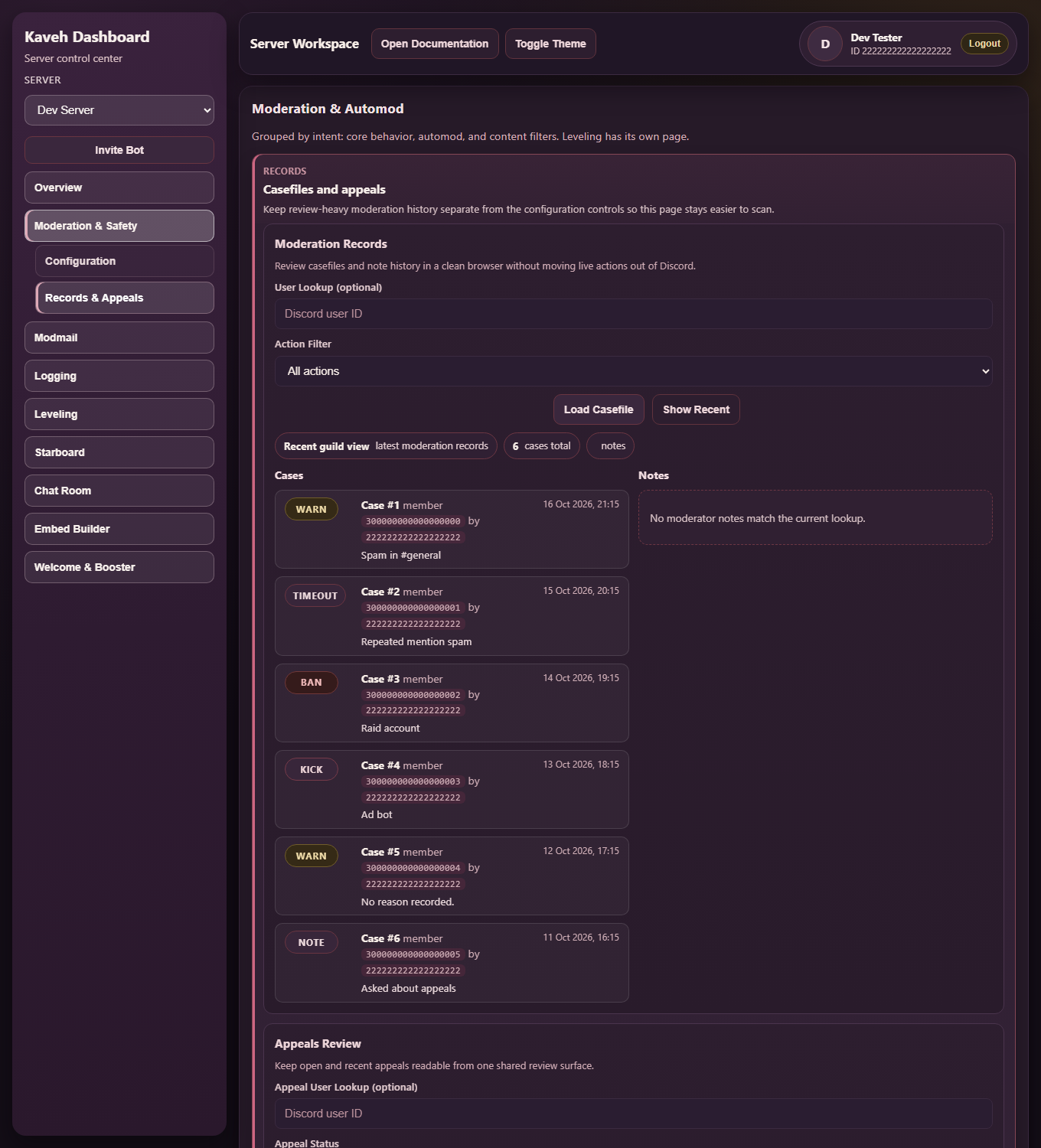
The screenshots on this page use a demo server with made-up data.
Appeals
Members who were banned or timed out can ask for a second look with /appeal submit. Appeals go to the channel you choose with /appeal channel, and a moderator answers with /appeal review.
Who can use these commands
The moderator and admin roles are chosen during setup (or with /setup roles). People without one of those roles can't use moderation commands. Server administrators and the owner always can.
Good habits
- Change one rule at a time.
- Review your blocked-terms list every few months.
- Once a week, look at the latest cases and check that automod isn't catching normal conversation.
Related
- Logging: where all of this is recorded
- Modmail: how members get in touch with staff
- Add Kaveh and set it up